
Family safety

Family safety check-ins for every generation at home

They said they would be home by eleven. It is midnight.

Safety Checkpoint tells the right person within minutes of a missed check-in. Your teenager, your partner on a late shift, your mother living on her own. Each of them checks in from their own account, and you are their contact.

No credit card required. The free plan covers one contact and one one-off check-in a month. Recurring check-ins and heartbeats are on Safety 101 ($4.99/month) and above. Upgrade anytime. Cancel anytime.

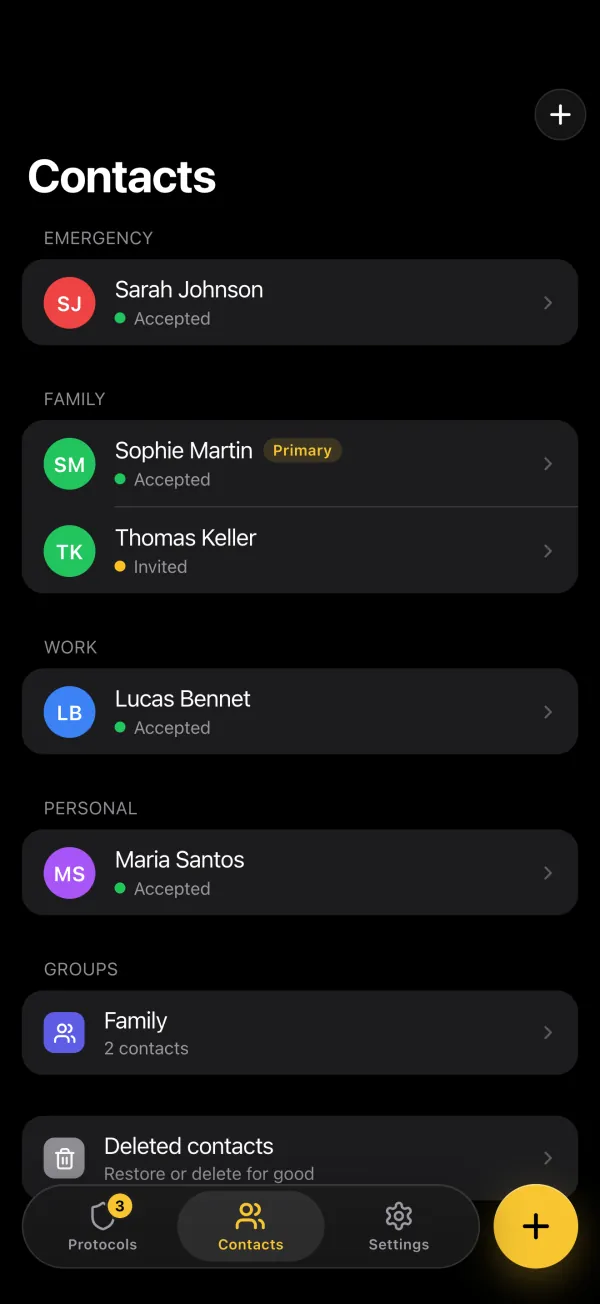
The Contacts tab in the app: contacts by category with their invitation status, a family group and deleted contacts

Home by 23:00

48 min left

Checked in · your contacts are told

No check-in · your contacts are alerted

Family contexts

One plan, three very different worries

A teenager, a night-shift commute and an elderly parent do not need the same check, but they need the same person to hear about it.

Each of them checks in from their own account, and the rest of the family are their contacts. Nobody checks in for someone else.

Location + heartbeat

Children and teens

Practice runs late. Plans change in a group chat you are not in. The phone dies.

  • Home later than agreed, and no message
  • Dead battery or no signal
  • The route changed at the last minute
  • Nobody is sure who should call first

Recommended protocol

Set an arrival check for the places that matter (a location protocol, on Survival, confirmed in the app once they are there), and a heartbeat for evenings with no fixed plan (on Safety 101 and above). Both run on their own phone, which you can set up together.

Recurring check-in

Working adults

A late train, a dinner that runs over, a drive home at one in the morning. The nights it matters least are the nights it could matter most.

  • Getting home long after everyone is asleep
  • Stuck somewhere with no way to warn anyone
  • Shifts that move without notice
  • Nobody knows what the plan was

Recommended protocol

A recurring check-in that matches the working week, on Safety 101 and above, and an alert if the confirmation never comes.

Check-in + heartbeat

Older relatives living independently

She calls every morning. One morning she does not. That silence is the signal, and it should reach you quickly.

  • The usual morning check does not happen
  • The phone is out of reach
  • Hours pass before anyone notices
  • No agreement on who goes round

Recommended protocol

A daily check-in set an hour after she is usually up, or a heartbeat with up to 30 minutes of grace, so a late breakfast does not become a false alarm. Both are on Safety 101 and above, in her own account, with you as a contact.

What a parent receives

You are told at 23:02, not at midnight.

An email (or SMS on Survival) with a link, two minutes after the check-in your daughter missed. With your PIN, you open the message she wrote before going out and see whether someone has already marked her safe.

  • Her message opens only with each contact's PIN, and yours was given to you when you accepted her invitation
  • Any contact can mark her safe from the page
  • Late but fine? She confirms the check-in: you are told and the link closes
  • As her contact, you need no account and no app

Start freeFree plan, no credit card.

From Safety Checkpoint23:02

Maya missed their check-in

Protocol
Home by 23:00
Missed at
23:00
Access emergency information

Opens with your PIN

Emergency page · unlocked with the contact's PIN

“If you get this, I'm not home yet. I was at Sam's, 14 Mill Lane, coming back on the 22:20 bus. Call me first, then Sam on 07700 900123. No answer? Drive along the bus route.”

  1. 23:00Deadline passed
  2. 23:02Contacts alerted
  3. 23:09Marked safe by a contact
Confirm Maya's safety

Protocol strategy

Three ways to check in, one per routine

Built around how your family lives. Routine check-ins and the heartbeat are on Safety 101 and above, arrival verification on Survival.

Routine check-ins

Best for structured schedules

  • Fixed confirmations for the school run, work, or the morning coffee.
  • Everyone knows what normal looks like.
  • No alert goes out unless a check-in is missed.
  • Suits older relatives and predictable commutes.

Flexible heartbeat

Best for variable days

  • Confirm you are fine at intervals, on days with no fixed plan.
  • Good for teens, travel days and shifting schedules.
  • Less rigid than a fixed time you will forget.
  • The alert fires only when the taps stop.

Setup

Set up your family check-ins in four steps

A few minutes per person, once, then it runs on its own.

  1. Decide who gets the call

    Every contact is alerted at the same time, so agree in advance who calls first, who follows up, and who goes round if nobody answers.

  2. Write what they will need to know

    One message per person, written in their own account, saying where they were going and what to do next. Their contacts open that with their PIN, not a form.

  3. Match the check to the routine, not the age

    A fixed check-in for predictable days, a heartbeat for unpredictable ones, an arrival check for a specific place. Recurring check-ins and heartbeats are on Safety 101 and above, the arrival check on Survival. The free plan covers one contact and one one-off check-in a month.

  4. Test it once a month

    Miss one check-in on purpose, with contacts who know it is a test, so nobody is reading an alert for the first time during a real one. On the free plan, that uses your protocol for the month.

Before you call it done

Four things worth confirming before you rely on it.

  • Two contacts for each person, never just one (the free plan allows 1, Safety 101 up to 10)
  • Everyone knows who is called first
  • Each message says something useful
  • A monthly test is in the calendar

Start freeFree plan, no credit card.

Frequently asked questions

Short answers first. Each one links to where the detail lives.

How do you keep your family safe with a check-in app?

Each family member who needs one sets up their own check-in protocol, in their own account. Each protocol has its own schedule, message, and contact list, so the right people are alerted for each person and use their PIN to open that person's details.

More detailLess detail
  • One protocol per family member, tailored to their routine and risk level
  • Each message can hold that person's specific medical details and access instructions
  • Family members can be contacts on each other's protocols for mutual coverage
  • Simultaneous notifications mean all of that person's contacts know at once
  • Common mistake: using one account or one protocol for the whole family instead of individual ones

What is the best family safety app in 2026?

The best family safety app gives each family member their own protocols, sends automatic alerts to the right contacts, and works across age groups, from elderly parents to traveling teens.

More detailLess detail
  • One account per person: separate check-ins for mom, dad, grandma, and teens
  • Automatic alerts: no one needs to remember to call or text
  • Customizable per person: different schedules, messages, and contacts
  • Email delivery on all plans, plus SMS on Survival for contacts who prefer text messages
  • A message encrypted for each contact, opened with their PIN, protects sensitive family health information

How does Safety Checkpoint help families stay connected?

Safety Checkpoint provides structured daily check-ins (recurring protocols, on Safety 101 and above) that replace ad hoc phone calls with a reliable system. If a family member misses their check-in, everyone who needs to know is alerted within minutes and opens the actionable details with their PIN.

More detailLess detail
  • Replace 'did you try calling mom?' with automatic, reliable notifications
  • Each family member gets a simple daily tap: no app complexity
  • Pre-written messages with medical and access details
  • All designated contacts are alerted at the same time and open the same message
  • Reduces anxiety between check-ins by providing a predictable safety routine

Can the whole family use one Safety Checkpoint account?

No. Each person who checks in has their own account and creates their own protocols. Nobody checks in for someone else. The rest of the family are their contacts, and contacts need no account and no app: an email address, one click to accept the invitation, and the PIN they are given.

More detailLess detail
  • A parent can set the app up with their teenager on the teenager's phone
  • Each person confirms check-ins on their own phone
  • Different schedules and contacts per protocol
  • Each person sees their own protocols in their own account. Contacts get a one-line email at each check-in, and an alert if one is missed
  • The same people can be contacts for several family members, invited from each account (e.g. all siblings on mom's protocol)

Family safety: check-in app vs location tracking. Which is better?

Location tracking shares where you are in real time. A check-in app only alerts contacts when you don't confirm you're okay. Check-in apps provide more privacy while still catching emergencies: contacts are only alerted when something might be wrong.

More detailLess detail
  • Location tracking requires constant GPS and drains battery
  • Check-in apps only involve a brief daily interaction
  • Location sharing is always-on, but check-in alerts are event-triggered
  • Check-ins are less intrusive, which matters especially for teens and independent seniors
  • For high-risk activities, you can add a position to your message while writing it: it is recorded at that moment, with no live tracking

Build your family safety net before an emergency

Set clear family roles now so your contacts can act quickly and calmly if someone misses confirmation.