
Night safety

Night safety check-ins for late commutes and shifts

The last train was at 23:40. You were not on it.

If you do not confirm you got home, the people you chose hear about it and open the message you wrote, with where you were headed.

No credit card required. Upgrade anytime. Cancel anytime.

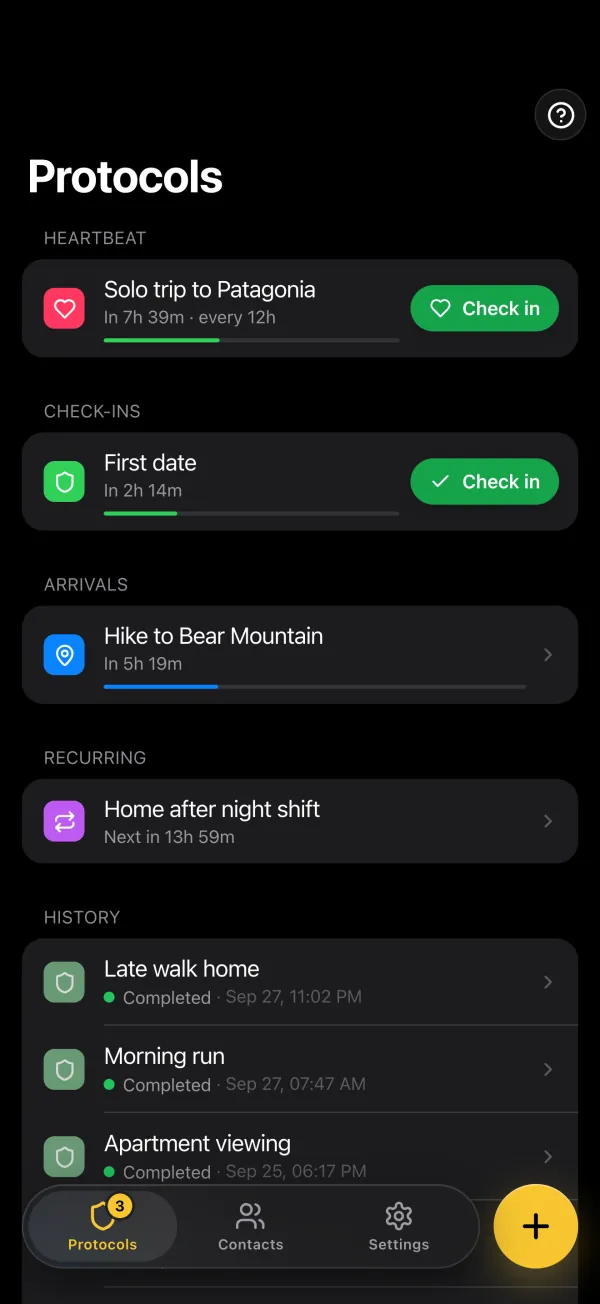
The Protocols tab on iPhone: a heartbeat, a check-in, an arrival, a recurring check-in for the way home after a night shift, and the history

Home by 00:30

1h 12m left

Checked in · your contacts are told

No check-in · your contacts are alerted

Common scenarios

Where night plans can break down

Different night situations need different protocol timing, but all require one clear response plan.

Check-in protocol

Night commutes and planned returns

You leave work late, travel alone, and expect to arrive home at a known time.

  • Last transit options are limited
  • Long or isolated routes
  • Device battery uncertainty
  • Delayed arrival without clear signal

Recommended protocol

Start it when you leave and set your expected arrival time as the deadline. Miss the confirmation and your contacts are alerted and open your message with their PIN.

Heartbeat monitoring

Events with no fixed end time

Parties, concerts, and social nights often run later than planned, with changing routes and timing.

  • Schedule shifts unexpectedly
  • You move between multiple places
  • Communication becomes intermittent
  • No single predictable return time

Recommended protocol

Use regular heartbeat confirmations every 1-4 hours so your contacts are alerted only if the confirmations stop. Heartbeat monitoring is on Safety 101 and above.

Location protocol

Getting home safely after midnight

Your priority is to have contacts alerted if you are not home by a defined deadline.

  • Late-night route changes
  • Rides canceled or unavailable
  • Unfamiliar areas after dark
  • Arrival uncertainty for family or roommates

Recommended protocol

Set your home zone and deadline (for example 3:00 AM). Once your GPS puts you inside the radius, you confirm in the app. If you have not confirmed by the deadline, your contacts are alerted. The location protocol is on Survival.

What your flatmate receives

An alert with your plan behind it, not a night of guessing.

An email (or SMS on Survival) with a link, two minutes after the missed deadline. From that link, your flatmate opens the message you wrote before leaving: where you were going, who to call, what to do first.

  • Your message opens only with your contact's PIN
  • Your flatmate can mark you safe from the page
  • Home late but fine? Tap I'm OK: your flatmate is told and the link closes

Start freeFree plan, no credit card.

From Safety Checkpoint00:32

Lena missed their check-in

Protocol
Home by 00:30
Missed at
00:30
Access emergency information

Opens with your PIN

Emergency page · unlocked with the contact's PIN

“If you get this, I'm not home and I haven't checked in. I was taking the 23:40 train from Central, then walking up Mill Road. Call me first. No answer? Call Dana, who closed the shop with me.”

  1. 00:30Deadline passed
  2. 00:32Contacts alerted
  3. 00:36Marked safe by a contact
Confirm Lena's safety

Protocol selection

Pick the right protection mode for tonight

Select the mode that matches how predictable your night schedule is. The free plan covers 1 contact and 1 one-off check-in a month. Recurring check-ins and heartbeat monitoring are on Safety 101 and above, and the location protocol is on Survival.

Check-in protocol

Best for planned returns

  • Configure one expected arrival time.
  • Send alerts only when confirmation is missed.
  • Keep the alert plan simple for night commutes.
  • Works well for predictable end times.

Heartbeat monitoring

Best for flexible social nights

  • Confirm safety at regular intervals.
  • Reduce manual setup during unpredictable nights.
  • Your contacts are alerted if check-ins stop unexpectedly.
  • Useful for long events with variable timing.

Setup

Set up your night safety check-in in four steps

Set up your contacts and message once, test them, then start a check-in on the nights you need it.

  1. Add trusted contacts first

    Start with people who can respond quickly at night: close friends, partner, family, or roommate.

  2. Write your message

    Include clear context: where you were going, the route you planned to take home, and what contacts should do first.

  3. Choose protocol and timing

    Use check-in for planned returns, heartbeat for flexible nights, or location for home-arrival verification.

  4. Activate before heading out

    Start it before you leave, so it is already running if you cannot reach anyone.

Night safety checklist

Worth confirming before you rely on it.

  • Trusted contacts configured (1 on the free plan, 10 on Safety 101)
  • Home zone and arrival deadline reviewed
  • Your message updated for tonight
  • Protocol tested once before relying on it

Start freeFree plan, no credit card.

Frequently asked questions

Short answers first. Each one links to where the detail lives.

How do you stay safe going out at night?

The best way to stay safe at night is to set up an automatic check-in before you go out. If you don't confirm you're home safely by a set time, your contacts are alerted and use their PIN to open your pre-written message, including your planned location and relevant details.

More detailLess detail
  • Set a check-in for your expected return time (e.g. 'home by midnight')
  • Pre-write an alert message with the venue, area, and who you're with
  • A delay after a one-off deadline accounts for normal delays without triggering false alarms
  • If you don't confirm, contacts know where you planned to be
  • Works even if your phone is lost, dead, or you can't use it

What is the best safety app for nighttime activities?

The best night safety app provides automatic check-ins with a custom schedule, sends alerts to personal contacts, and works without manual activation during a crisis. Safety Checkpoint's pre-written message includes the location context you wrote so contacts can act fast.

More detailLess detail
  • Custom check-in times for nights out, late shifts, or commutes
  • Pre-written messages with venue name, area, and planned route home
  • The delay you set after a one-off deadline adapts to your normal return variability
  • Personal contacts are more responsive than a monitoring center at night
  • Low battery impact: no GPS running in the background

How does a check-in app help with night safety?

A check-in app makes sure someone is alerted if you don't get home safely. Unlike location sharing (which requires your phone to be on and connected), a check-in alert triggers from the server when your confirmation is missing, so it works even if your phone is off.

More detailLess detail
  • Set a check-in for your expected return time before going out
  • If you're home safe, one tap confirms and no alert is sent
  • If you don't confirm, your contacts are alerted and use their PIN to open the message you prepared
  • More private than real-time location sharing: contacts get a one-line email at each confirmation and the full alert only if something is wrong

What should you include in a night safety protocol?

Include the venue or area you're going to, who you're meeting, your expected return time, and any relevant details (medical conditions, allergies) that contacts might need if they're checking on you.

More detailLess detail
  • Venue name and address (or neighborhood if plans are flexible)
  • Names of people you're meeting, if applicable
  • Expected return time and mode of transport (taxi, bus, walking)
  • Medical details: allergies, medications, conditions
  • What contacts should do first: call you, then call a specific friend, then contact authorities

Don't wait for a bad night to set up protection

Set your protocol in a few minutes and your contacts are alerted automatically if a check-in or arrival confirmation is missed.