
Solo travel safety system

Solo travel safety app

You said you would message when you arrived. That was Tuesday.

Safety Checkpoint is a solo travel safety app built on the check-ins you set before you leave. If one is missed, the people at home are alerted and open your message and your itinerary with their PIN, without you having to do anything.

Built for real travel conditions. No credit card required. The free plan covers one one-off check-in a month. Recurring and heartbeat protocols are on Safety 101 ($4.99/month) and above, the location protocol on Survival. Upgrade anytime, cancel anytime.

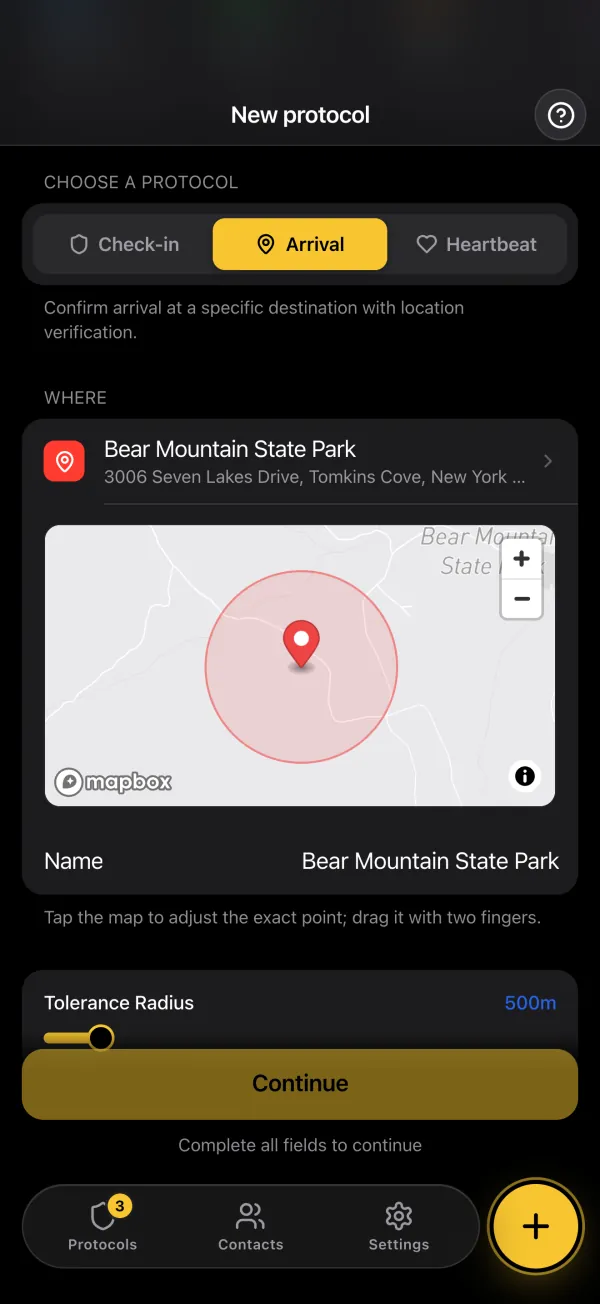
Creating an arrival protocol in the app: the destination, its point on a map and its radius

Arrival in Cusco

1h 35m left

Checked in · your contacts are told

No check-in · your contacts are alerted

Common travel risks, mapped to clear response flows

Different trips need a different kind of check. Select the protocol that matches your itinerary and activity profile.

Check-in protocol

Backpackers & long-term travelers

Remote-area incident with no reliable signal

  • Unstable terrain or weather delays
  • Low network availability
  • Delayed external visibility
  • Time-sensitive support needed

Recommended response

Set a daily confirmation time with a recurring check-in, on Safety 101 and above (the free plan covers one one-off check-in a month). If it is missed, your contacts are alerted automatically and open your message with their PIN. A position is in the message only if you added it while writing.

Heartbeat monitoring

Adventure travelers

High-risk activity interruption

  • Equipment failure
  • Extended route deviation
  • Battery depletion
  • Limited access to assistance

Recommended response

Use periodic confirmations during activities (Safety 101 and above). A missed heartbeat alerts your trusted contacts.

Location protocol

Business & urban travelers

Unexpected event in an unfamiliar city

  • Language barriers
  • Unfamiliar routes at night
  • Late return uncertainty
  • Need for rapid contact coordination

Recommended response

Set your expected destination and arrival time, then confirm in the app once your GPS puts you inside the radius (Survival). If arrival is missed, your contacts are alerted and open your message.

What your brother receives

An alert with your itinerary behind it, not a silence.

An email (or SMS on Survival) with a link, two minutes after the missed check-in. From that link, your brother at home opens the message you wrote before leaving and sees whether someone has already marked you safe.

  • Your message opens only with each contact's PIN
  • The alert is sent from our servers, even if your phone is off or lost
  • Any contact can mark you safe from the page
  • Late but fine? Confirm the check-in: he is told and the link closes

Start freeFree plan, no credit card.

From Safety Checkpoint20:02

Maya missed their check-in

Protocol
Arrival in Cusco
Missed at
20:00
Access emergency information

Opens with your PIN

Emergency page · unlocked with the contact's PIN

“If you get this, I haven't confirmed my arrival in Cusco. I left Arequipa on the 8 am bus. Call Rosa, my host in San Blas, first. If she hasn't seen me, call my insurer's assistance line.”

  1. 20:00Deadline passed
  2. 20:02Contacts alerted
  3. 20:09Marked safe by a contact
Confirm Maya's safety

Two ways to stay protected abroad

Safety Checkpoint offers two complementary approaches to adapt to your travel style and itinerary. Heartbeat monitoring is on Safety 101 and above. The location protocol is on Survival.

Heartbeat monitoring

Continuous protection, one tap per interval

Tap to confirm at the interval you choose, from 15 minutes to 7 days. If the interval, plus the grace you set, passes without a tap, your contacts are alerted automatically. This mode suits unpredictable adventures and remote exploration where schedules don't exist.

  • Multi-day treks without reliable schedules
  • Remote camping and wilderness trips
  • 24/7 protection with no fixed daily time: it runs until you stop it
  • Best for spontaneous travelers

Location protocol

Be at a specific place at a specific time

Define where you should be at a given time, then confirm in the app once your GPS puts you inside the defined zone. Nothing is detected in the background. If you have not confirmed when expected, Safety Checkpoint automatically alerts your contacts.

  • Meeting point after a solo hike
  • Arrival at your hotel by a certain hour
  • Return to base camp after an excursion
  • Reaching a checkpoint on your itinerary

Set up before you leave home

Set it up in a few minutes, before you leave.

  1. Add trusted contacts

    Set one primary and one backup contact who can respond quickly if your confirmation is missed (1 contact on the free plan, up to 10 on Safety 101). All your contacts are alerted at the same time.

  2. Choose your protocol type

    Pick check-in, heartbeat (Safety 101 and above), or location protocol (Survival) based on your travel style and event risk.

  3. Write your message

    Include itinerary context, accommodation details, support instructions, and any essential personal notes.

  4. Add location context

    Add a position with the GPS button while you write, so your emergency message can include useful position information. It is recorded at that moment, and nothing is located when the alert fires.

Travel checklist

  • Update your itinerary whenever plans change: a protocol cannot be edited, so stop it and create a new one
  • Store travel insurance details in your message context
  • Add local support contacts where possible
  • Choose check-in times that fit contact time zones
  • Set the language of each contact (English, French or Spanish). The alert and the emergency page reach them in it

Start freeFree plan, no credit card.

Frequently asked questions

Short answers first. Each one links to where the detail lives.

How do you stay safe when traveling alone?

The most reliable solo travel safety measure is pre-trip preparation: set up automatic check-ins before you leave, share your itinerary with trusted contacts, and pre-write emergency messages with location details and medical information.

More detailLess detail
  • Set daily check-ins at your expected return or rest times. They are recurring protocols, on Safety 101 and above (the free plan covers one one-off check-in a month)
  • Pre-write an alert message with your planned route and accommodation details
  • Share your itinerary with your contacts, people who are not on the trip
  • Automatic check-ins work even if you can't use your phone during an emergency
  • Common mistake: relying only on a daily call or text to someone, which is easily forgotten

What is the best safety app for solo travelers?

The best safety app for solo travelers provides automatic alerts when you miss a check-in, includes pre-written emergency context for responders, and works without requiring manual action during a crisis.

More detailLess detail
  • Automatic check-in alerts trigger from the server
  • Pre-written messages include location, accommodation, and medical details
  • Low battery impact compared to always-on GPS tracking apps
  • Multiple contacts notified simultaneously for faster response
  • Works for hiking, backpacking, road trips, and urban travel alike

How does an automatic check-in protect solo travelers?

An automatic check-in detects when you fail to confirm you're okay and alerts your contacts without any action from you. This covers the scenario where manual safety apps fail: when you're injured, lost, or can't use your phone.

More detailLess detail
  • Daily check-in at your expected return time catches delays or incidents (a recurring protocol, on Safety 101 and above)
  • If you don't confirm, contacts are alerted and open your pre-written emergency message with their PIN
  • The message can include your planned route, a GPS position you added while writing, and medical information
  • Your contacts can coordinate with local emergency services using the details you provided
  • A delay after a one-off deadline prevents false alarms from brief delays or signal drops

What should you do if you lose your phone while traveling solo?

If you lose your phone, most safety apps stop working, except check-in systems. Since the alert is triggered server-side when your confirmation is missing, your contacts are still alerted even if your phone is lost, broken, or dead.

More detailLess detail
  • No phone needed on your side for the alert to go out
  • Your pre-written message is already stored, ready for your contacts to open with their PIN
  • This is a key advantage over panic buttons that require phone access
  • Keep a physical copy of your emergency contacts and accommodation details as backup
  • Register with your embassy or consulate before traveling to high-risk areas

How do you set up emergency contacts before a solo trip?

Before any solo trip, add at least 2 trusted contacts to your check-in protocol if your plan allows it (1 on the free plan, up to 10 on Safety 101). Each contact should know your planned itinerary and understand what to do if they receive an alert, including who to contact locally.

More detailLess detail
  • Add family members or close friends as contacts. They are all alerted at once
  • Include at least one contact in your home timezone for round-the-clock coverage
  • Brief each contact on your itinerary and what the alert means
  • Include local emergency numbers (police, embassy) in your alert message
  • Test the protocol once before departure with a deliberate miss, so contacts know what to expect (on the free plan, that uses your protocol for the month)

Don't wait for a travel incident to set up your solo travel check-in

Prepare once before your trip. If confirmation is missed, your trusted contacts are alerted within minutes and open the message you wrote.