Set a deadline, and we alert your people if it runs out.
Safety Checkpoint is a safety timer app for the moments a text is not enough. Start a timer before the walk, the ride, the hike or the date. Check in when you are safe and your contacts get one line saying so. Let it run out and the people you chose are alerted and use their PIN to open the message you wrote.
Free plan, no credit card. Works in any browser. Your contacts need no app.
Walk home
Check-in
0h 25m
left
DeadlineTonight, 23:30
MayaEmergency contacts
Emergency packageMessage
If you don't confirmAlert at 23:32
Walk home
Check-in
Checked in
at 23:05
Maya got a one-line email: you checked in.
StatusCompleted
MayaEmergency contacts
Emergency packageNot opened
Walk home
Check-in missed
23:32
alert sent on your silence, two minutes after the deadline
Maya got an email with a link. With her PIN, she opens the message you wrote.
ChannelsEmail · SMS on Survival
She can mark you safeFrom the emergency page, with her PIN
Late but fine? Confirm check-inShe's told, the link closes
What is a safety timer?
A safety timer, also called a check-in timer, trip timer or journey timer, is a countdown you start before doing something alone. If you stop it in time, your contact gets a one-line confirmation. If you do not, someone is told. It is the quiet alternative to texting “home safe” and hoping the other person notices when the text never comes.
A safety timer covers the situations where you cannot press a panic button because you are hurt, unconscious, or your phone is gone. It does not need you to do anything at the moment things go wrong. It needs you to have done something before.
How to set a safety timer in Safety Checkpoint
A few minutes. Each outing is its own protocol and counts against the monthly quota: 1 on the free plan, 10 on Safety 101, 25 on Survival. For the same arrival time every night, a recurring protocol on Safety 101 and above runs daily and counts once. Alerts go by email on every plan, and by SMS as well on Survival.
1
Set the deadline: your ETA plus a margin
A 25-minute walk gets a 35-minute timer. A day hike gets the planned return plus the time it takes to get back into coverage.
2
Write what should happen if it runs out
Where you are going, which route, who you are meeting, what you want done. The GPS button records where you are as you write, so for a hike put the trailhead, the route and the planned return point in words. On the paid plans, add a photo of the trail map or a license plate.
3
Pick who is told
One person or several. They receive the alert by email, and by SMS too on the plan that includes it, with no app to install and no account to create. They accept your invitation once and keep the PIN they are given.
4
Start it, then check in when you are safe
One tap on arrival ends the timer. Your contacts get a one-line email saying you checked in, and the emergency message stays sealed. Running late? A protocol cannot be edited once it runs: stop it and create a new one, or set a delay after the deadline before you leave.
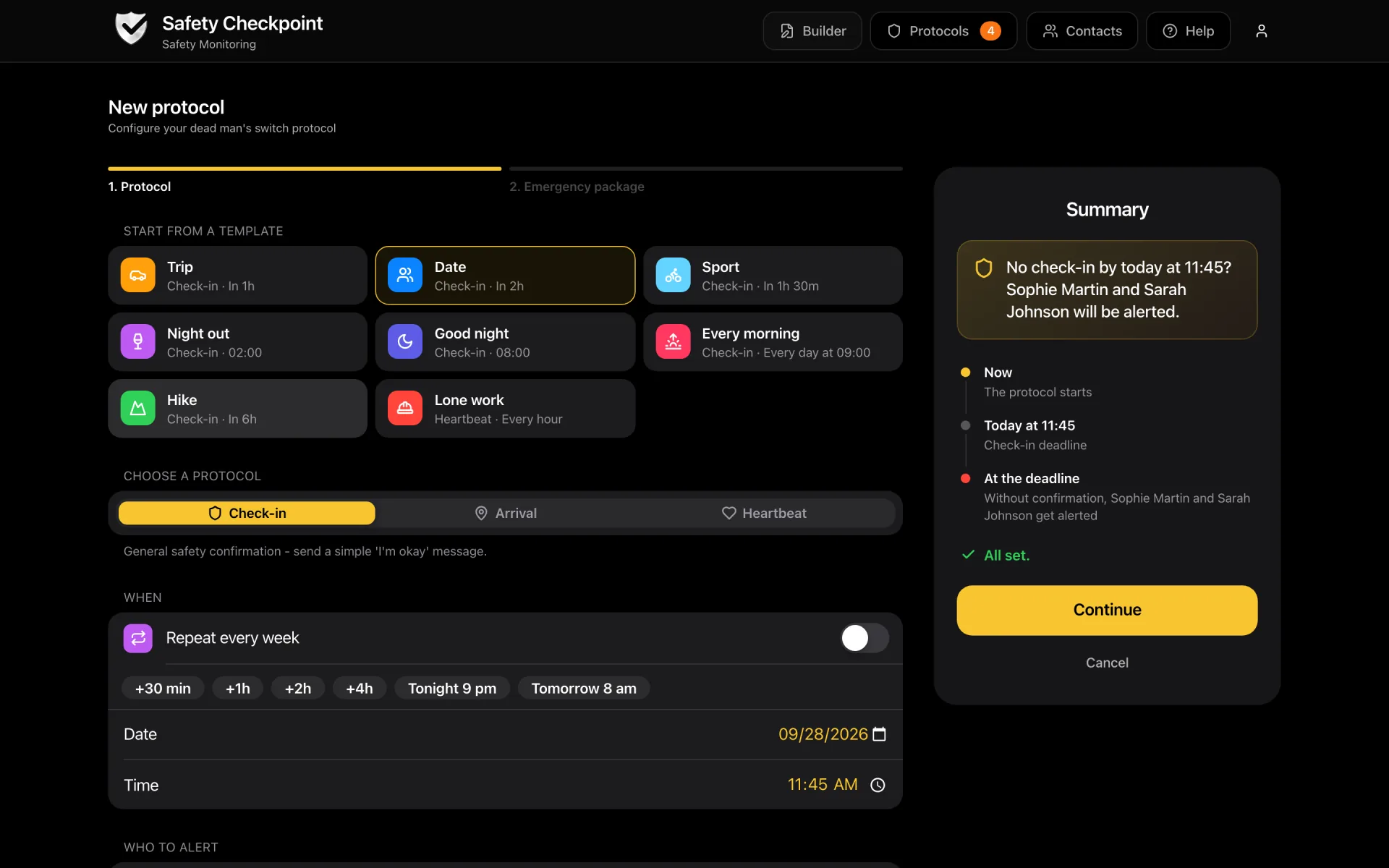
Starting a timer on the web: pick a template or a quick deadline, write the message, choose who is alerted.
When do people start a safety timer?
Each situation has its own guide with a ready-made timer length and message.
Shows a dot on a map to someone who has to be looking at it. It tells them where you are, never whether you are fine: a dot that stops moving looks the same asleep, at dinner, or on the ground. And it runs all evening, whether anything happens or not.
A safety timer
Sends a one-line confirmation when you check in, and alerts your contacts only when you do not. Nobody watches a map. With their PIN, your contacts open the message you wrote, with your own words about what to do and, if you added one, the position you recorded while writing it (not a live one). Put the route and the planned return point in the message and the two approaches complement each other, without the surveillance in between.
Does my phone already have a safety timer?
Probably. iPhones have Check In inside Messages, and Google’s Personal Safety app on Pixel phones has Safety Check. Both are free and both are worth using. The table shows where they stop.
Compare with
Feature
iOS Check In
Android Safety Check
Safety Checkpoint
Works whatever phone your contact has
Holds a message you wrote in advance
A short reason or note
Reaches contacts by email or SMS, no app needed
Email on every plan, SMS on Survival
Files, credentials or an audio recording on the page your contact opens with their PIN (paid plans)
Recurring daily check-in (Safety 101 and above) as well as one-off timers
Free to use
Yes: 1 one-off timer a month, 1 contact
iOS Check In lives in Messages: you start it in a conversation, and if you do not arrive or respond, that contact receives your location, battery and signal status. Both sides need an iPhone with iMessage, one contact per Check In, and there is no message of your own. For an iPhone-to-iPhone trip with nothing to explain, use it.
Android Safety Check starts a countdown and, if you do not confirm, shares your live location with your emergency contacts, who can also be told when it starts and ends. You pick a reason or type a short note of your own; there are no files, no sealed package and no daily routine. Availability depends on the phone and region.
Use Safety Checkpoint when the message matters, when your contacts do not share your phone brand, or when the same protocol has to run every day. Eight check-in apps compared.
What your contacts receive when the timer runs out
An alert with your name, the protocol, the time the timer expired and a link, not the message itself. A contact’s PIN opens the emergency page behind the link: your message as you wrote it, the GPS position you recorded in it while writing if you added one, the protocol details and your instructions. On the paid plans, files and credentials are encrypted for each contact and open with the same PIN, the one they were given when they accepted your invitation. On those plans, an audio recording can be part of the package too. Delivery is by email on every plan and by SMS on Survival, to all contacts at once.
Short answers first. Each one links to where the detail lives.
Does iPhone have a built-in safety timer?
Yes. Check In, in the Messages app on iOS 17 and later, lets you set a timer or a destination and tells one contact if you do not arrive or respond, with your location and battery level. It needs an iPhone on both sides and carries no message of your own.
More detailLess detail
Free, already installed, worth turning on for iPhone-to-iPhone trips
The contact must use iMessage; there is no email or SMS fallback
One contact per Check In, no pre-written instructions, no files
No recurring daily version for living alone
Safety Checkpoint covers those gaps and works alongside it
Can I extend a safety timer that is already running?
No. A running protocol cannot be edited or extended, by design. There are two ways to handle a late train. Set a delay after the deadline before you leave, from 1 minute to 48 hours, so a late tap inside the delay still cancels the alert. Or stop the timer (stopping asks for your PIN), or check in to end it, and create a new one with a later deadline, which counts as a second protocol on your monthly quota (1 a month on the free plan).
More detailLess detail
A delay after the deadline, set before you leave, is the cheap way to absorb lateness
Stop and recreate if the plan itself changes. The stop needs your PIN, and the new protocol takes a few minutes
A fired alert cannot be recalled: once sent, your contacts have it
A one-off timer cannot be paused (only daily protocols can)
Ending it on arrival is a single tap
A check-in up to 2 minutes after the deadline still counts
Does a safety timer drain the battery or track me?
No. The timer is enforced on our servers, so your phone does nothing while it runs. A GPS position is captured only when you press the button while writing the message, and it is not refreshed afterwards. Nobody sees where you are while the timer is running.
More detailLess detail
No background GPS, no continuous sharing
The alert fires even if your phone is dead or out of coverage
Write your route and planned return point in the message, because the GPS button records where you are when you write, not where you end up
Your message is encrypted for each contact with AES-256 and opens with their PIN, and so are your files on the paid plans
Between two check-ins nothing is tracked. Contacts get a one-line email when you confirm
Yes on the free plan, Safety Base: 1 one-off protocol a month, 1 contact, unlimited email alerts, no credit card. That is enough to test the chain or to cover an occasional late walk. Running it every night takes a recurring protocol on Safety 101, at $4.99 a month.
More detailLess detail
Safety Base (free): 1 one-off protocol a month, 1 contact, unlimited email alerts, no file storage
Safety 101 ($4.99/mo): 10 protocols a month, 10 contacts, recurring and heartbeat modes, 50MB encrypted file storage
Survival ($9.99/mo): 25 protocols a month, 20 contacts, 10 SMS alerts a month on top of email
Your contacts never pay and never install anything
If you set a delay after the deadline, it runs first. If you still have not checked in, the alert is sent. That is the system working as designed. A false alarm costs one call to say you are fine, and a missed real one costs far more.
More detailLess detail
Choose a delay after the deadline that matches how often you forget your phone, up to 48 hours
Reminders 15 and 5 minutes before the deadline, by push in the iPhone app and by email everywhere, help you catch a forgotten timer
Tell your contacts in advance that a false alarm is possible and what to do
After the alert, tap I'm OK, no PIN needed: your contacts are told by email and the link closes
If you get frequent false alarms, lengthen the delay rather than skipping the timer
Can I set a safety timer for someone else, like a teenager or a parent?
No, nobody can start a timer for someone else. The person doing the activity runs the timer on their own phone, in their own account, because they are the one who has to check in. You can set up the protocol with them and be the contact who is alerted. The terms set a minimum age of 16. A parent can set the app up with their teenager, on the teenager's phone.
More detailLess detail
One account per person, but a caregiver can be the contact on several protocols
Set up together once, then the routine is their tap
Teens keep control of the message, which is what makes them use it
For a parent living alone, a recurring daily check-in (Safety 101 and above) suits better than a timer